Sooner or later, a client forwards you a headline and asks the question in five words: “Can we just opt out?”
The honest answer is yes. Since August 31, 2026, any website can opt out of AI Overviews and AI Mode with a single setting in Google Search Console.
The more useful answer is that, for almost every client on your books, opting out is a mistake. Saying so without reasons, though, is lazy advice, and clients can usually tell.
There is a narrow set of situations where blocking Google’s AI features is genuinely defensible. The framework below separates those cases from the far more common reflex, using five questions asked in a fixed order.
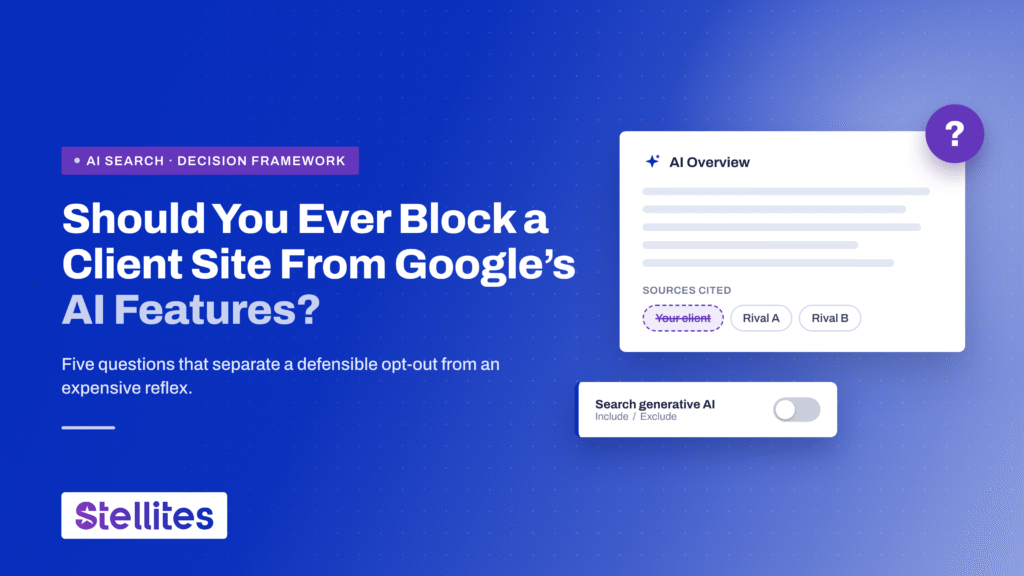
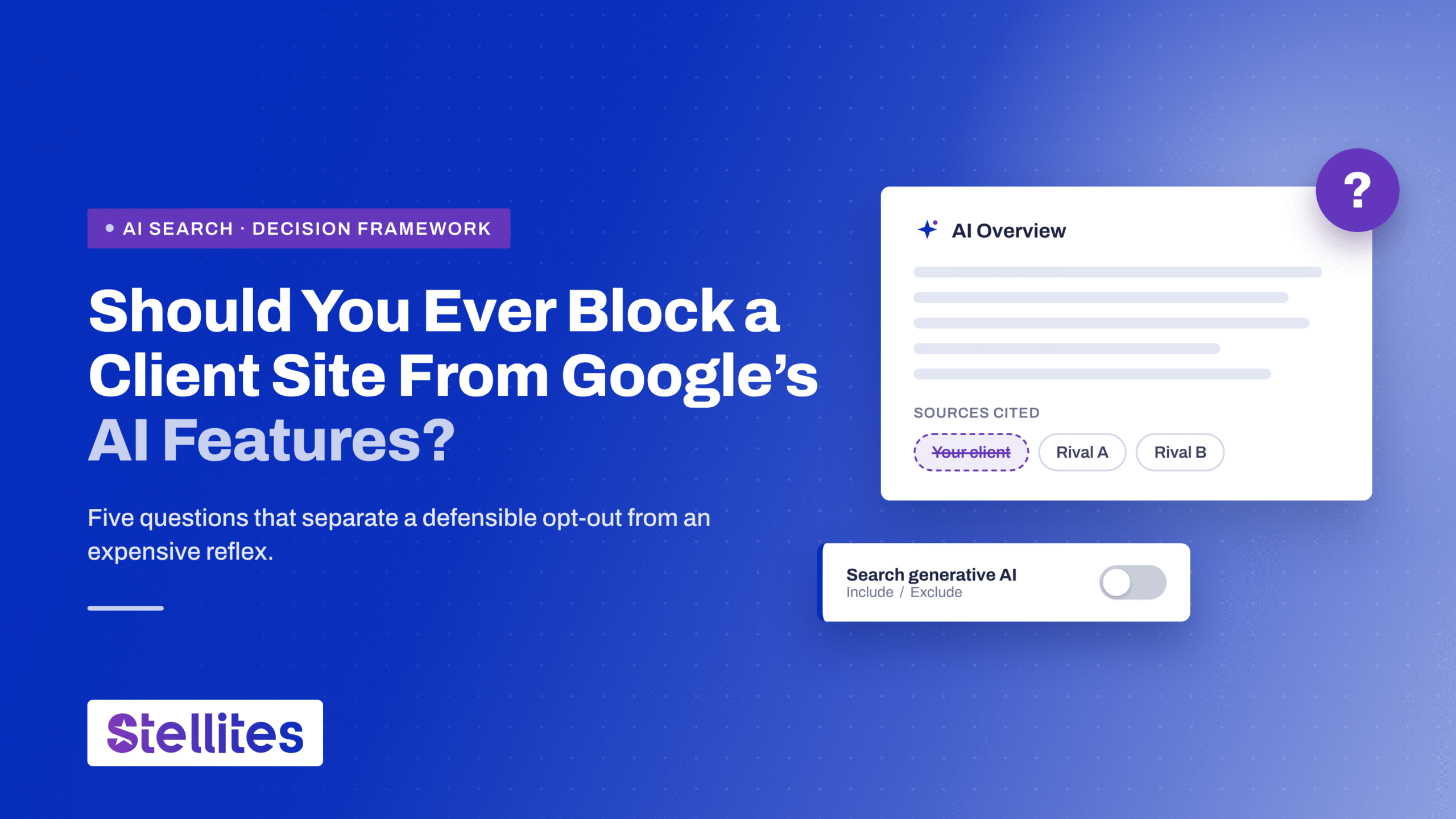
The short answer: Google’s Search generative AI control lets a site owner exclude a Search Console property from AI Overviews, AI Mode, and AI features in Discover.
Google began honoring the setting on June 17, 2026, and rolled it out to every site worldwide on August 31, 2026.
Excluded sites receive no traffic or impressions from those features. Google says the setting does not affect rankings in standard results.
Most client anxiety about the Google AI opt-out rests on a few misreadings. It pays to correct them before anyone touches a setting.
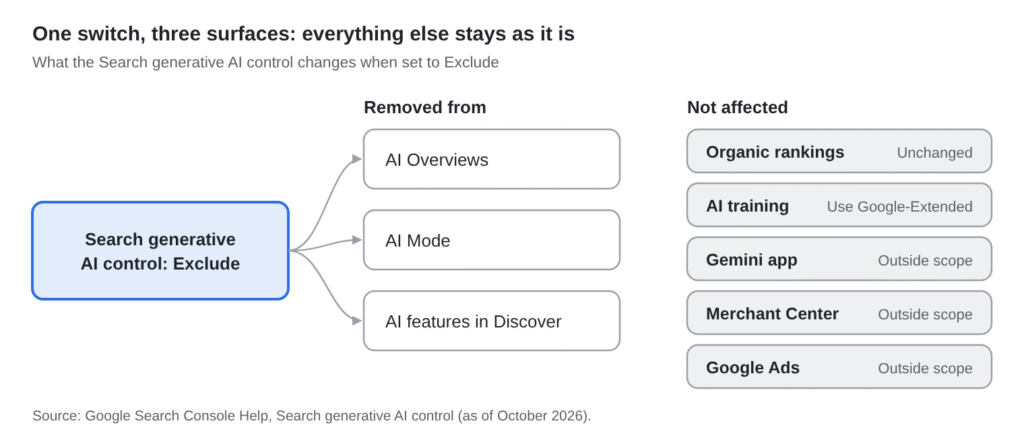
The control sits under Settings, then Search generative AI, in Search Console. Choosing Exclude removes a property’s links and content from three surfaces:
Google notes that it expects to update that list over time. A client who opts out today is quietly opting out of whatever Google launches next.
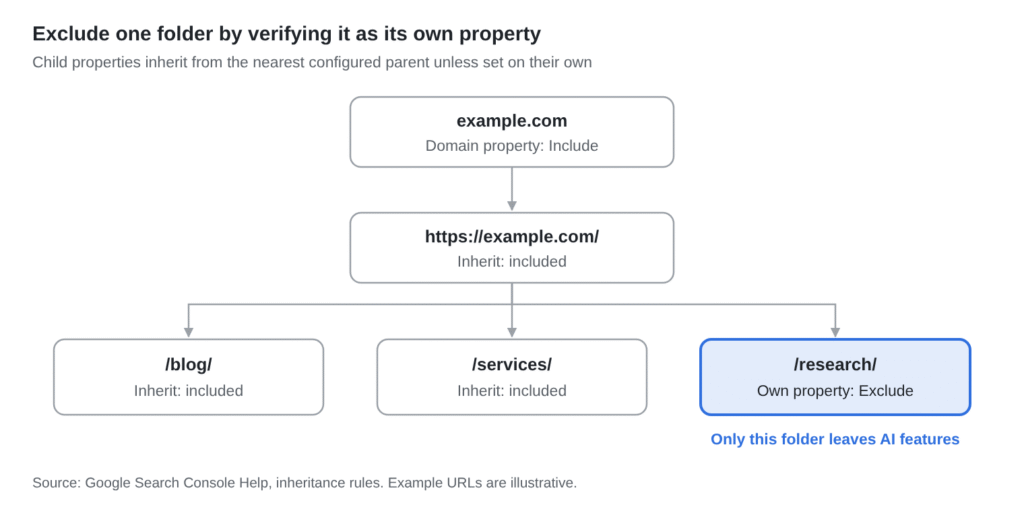
The setting works per Search Console property, and child properties inherit from their nearest configured parent. So a folder verified as its own URL-prefix property can be excluded alone. That detail matters later.
Browser extensions that “block AI Overviews” only hide them from whoever is using that browser. They change nothing about whether a client’s content appears for anyone else.
Here is how the available levers compare:
| Lever | Removes you from AI Overviews? | Affects normal search? |
| Search generative AI control | Yes | No |
| Google-Extended (robots.txt) | No | No |
| nosnippet meta tag | Yes | Yes, it strips your snippet |
| noindex | Yes | Yes, it removes the page |
Sources: Search Console Help; Google Search Central.
Dismissing the opt-out outright would be glib. The arguments for it are real, and a client who raises them deserves a considered reply rather than a reflexive one.
Pew Research Center found that users who saw an AI summary clicked a traditional result in 8% of visits, against 15% when no summary appeared. Links inside the summary itself drew roughly 1%.
For content that answers a quick factual question, the AI layer behaves less like a referrer and more like a substitute.
For an ad-funded publisher, an impression inside an AI Overview earns precisely nothing. Index Exchange data showed that 69% of publishers saw ad opportunity declines throughout 2025.
A client that funds original research can watch its findings restated in an answer box, with the visit going nowhere. The UK regulator required clearer attribution from Google precisely because attribution had been weak.
Google now pays about 100 publishers through an AI contribution pilot. Some larger publishers have reportedly declined to join, holding out for better terms.
Leverage has limits, though. When French newspapers complained in August 2026, Google pointed to the opt-out itself as the remedy. A threat only works if you can afford to carry it out.
These arguments are sound. They simply apply to a far smaller group of clients than the headlines imply.
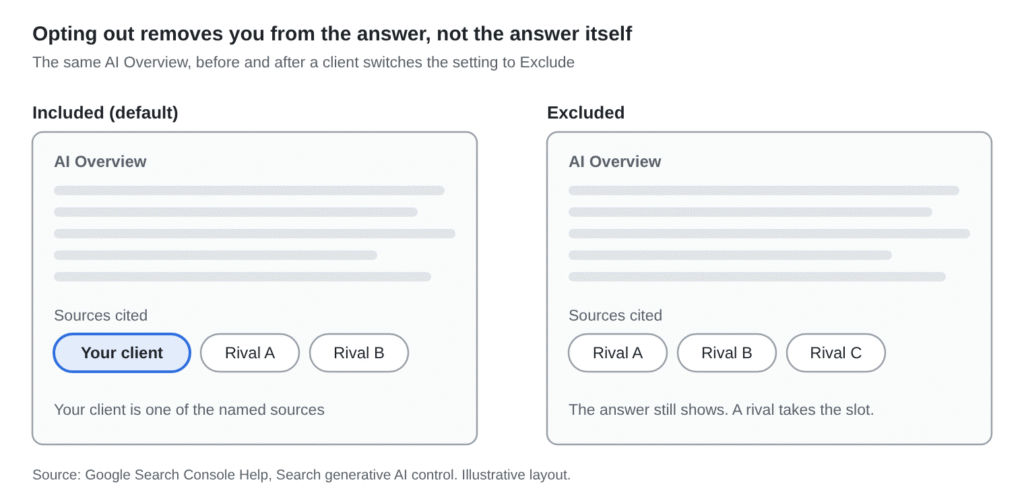
Here is the detail that reframes the whole debate. Google’s documentation states that once a site is excluded, content from other sites remains available in these features and may look similar.
The user still receives an answer. It is simply assembled from a competitor’s pages.
Opting out does not hide the AI answer from your customer. It hides you from the AI answer.
Seer Interactive tracked 53 brands and 2.43 billion organic impressions from January 2025 to February 2026. On AI Overview results, cited brands earned about 120% more organic clicks per impression than uncited ones.
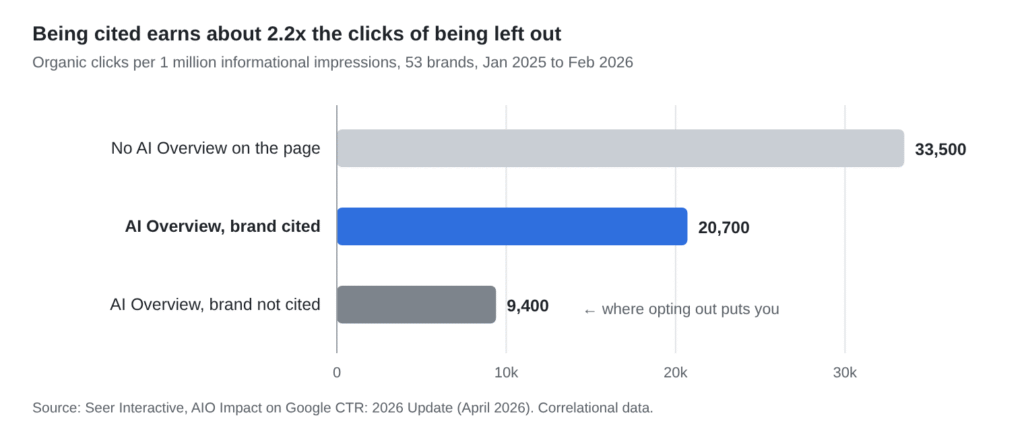
Per million informational impressions, that works out to roughly 20,700 clicks when cited and 9,400 when not. Opting out guarantees the second number on every query that shows an AI Overview.
Seer is careful to call its data correlational, since stronger brands tend to earn citations. Even so, cited brands outperformed uncited ones in every month of the dataset.
The closest real-world test comes from news publishers that blocked AI crawlers. Researchers at Rutgers and Wharton found traffic fell about 7% within six weeks, which they attribute to reduced brand exposure.
That study measured crawler blocking rather than Google’s new toggle, so treat it as a proxy. It remains the only causal evidence on the question.
Alphabet reported Search queries at an all-time high in early 2026. AI Overviews now reaches more than 2.5 billion monthly users, and AI Mode more than one billion.
An opted-out client, in other words, steps away from the fastest-growing part of the largest search engine on earth.
Ask these questions in order. The first answer that points to “stay in” settles the matter, and most clients reach it at question one.
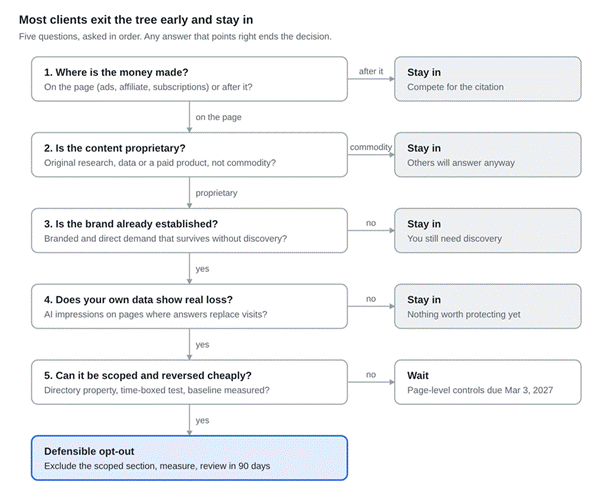
Figure: Decision tree for client opt-out requests. Alt text: “Decision tree to stop appearing in AI Overviews only when five questions point to a defensible opt-out.”
If revenue arrives after the visit, through a lead form, a booked call, or a sale, being named in the answer is the objective. A click is welcome, but it is not essential.
Verdict if revenue comes later: stay in and compete for the citation.
If a page answers a question that dozens of sites could answer, opting out changes nothing for the user. Google will simply quote someone else.
Verdict if the content is commodity: stay in.
A brand with strong branded search and direct traffic can absorb the loss of AI discovery. A challenger brand, still building awareness, cannot afford to disappear from the answers its buyers read.
Verdict if the brand is still building demand: stay in.
Open the generative AI performance report in Search Console and see which pages earn AI impressions. Under the UK regulator’s rules, Google must also provide click and click-through data from December 3, 2026.
Verdict: if exposure is low, or sits on pages that don’t drive revenue: stay in.
If the proprietary material lives in one folder, that folder can be excluded alone. If it is scattered across the site, today’s only option is the whole property, and that is rarely worth it.
Verdict if it can’t be scoped: wait for page-level controls in March 2027.
A scoped, time-boxed opt-out of that one section becomes defensible. Record a baseline first, change the setting, and review the results after 90 days.
The framework is deliberately strict, but it isn’t a polite way of always saying no. Three kinds of client can pass all five questions.
When the pageview is the product and the brand is large enough to negotiate, absence can become a bargaining chip. Scale is the prerequisite; without it, the threat carries very little weight.
If a free AI summary competes directly with a paid report, protecting that report is rational. The condition is that the proprietary content sits in its own folder, so the exclusion can be scoped.
A disciplined experiment can answer questions that aggregate studies cannot. It needs a clean baseline, reliable click data, and a fixed date on which the decision gets reversed or kept.
For the bulk of agency client books, the framework exits early:
B2B and SaaS: comparison queries trigger AI Overviews 95.4% of the time in Seer’s data, and that is exactly where shortlists take shape.
Professional services: revenue happens after the visit, so a citation builds trust before the first call.
Local service businesses: transactional queries show AI Overviews only about 5% of the time, so there is little to protect.
Ecommerce brands: AI answers increasingly recommend products, and absence removes organic mentions.
Challenger brands: they need discovery more than anyone else in the market.
That list, for most agencies, describes nearly every client on the roster.
When a client says “opt out,” they often mean “stop them using our work for free.” That calls for a scalpel rather than an axe.
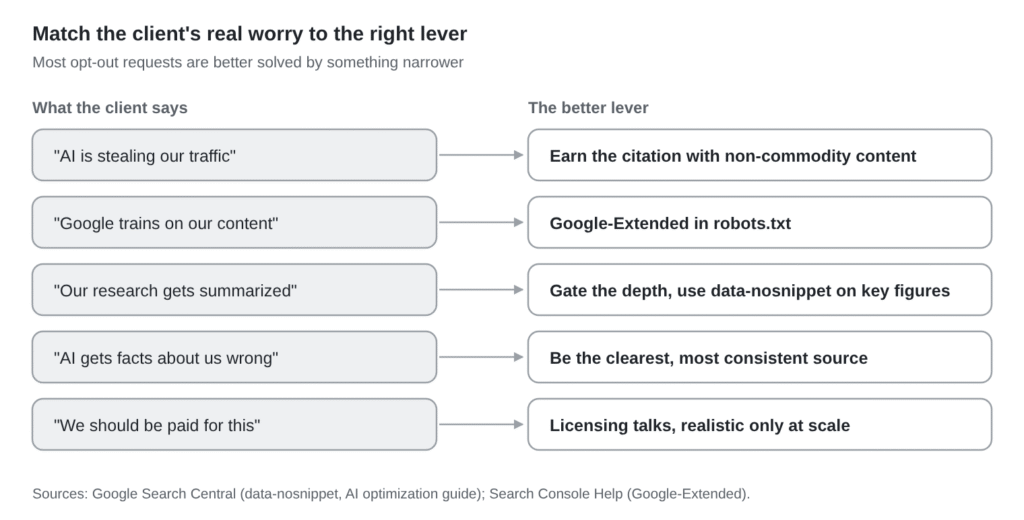
Publish the finding, gate the depth. Put headline results on an open page that can be cited, and keep the full dataset or tool behind an email or subscription.
Shield specific blocks. The data-nosnippet attribute keeps a marked section out of snippets and AI features while the rest of the page stays eligible.
Scope the opt-out to one folder. Verify the research folder as its own URL-prefix property in Search Console, then exclude only that property.
Use Google-Extended for training concerns. It governs model training rather than AI Overviews, and it only applies going forward.
Name your frameworks and indexes, so any summary has to attribute them by name. Encourage loyal readers to add the client as a Preferred Source, which Google now surfaces inside AI Overviews and AI Mode.
It also helps to know what to ignore. Google’s own guidance says llms.txt files and “chunked” content are not needed for Search, which spares clients a fair amount of wasted effort.
The opt-out available today is the blunt version. Under the UK regulator’s conduct requirement, Google must offer directory-level and page-level controls for AI Overviews and AI Mode by March 3, 2027.
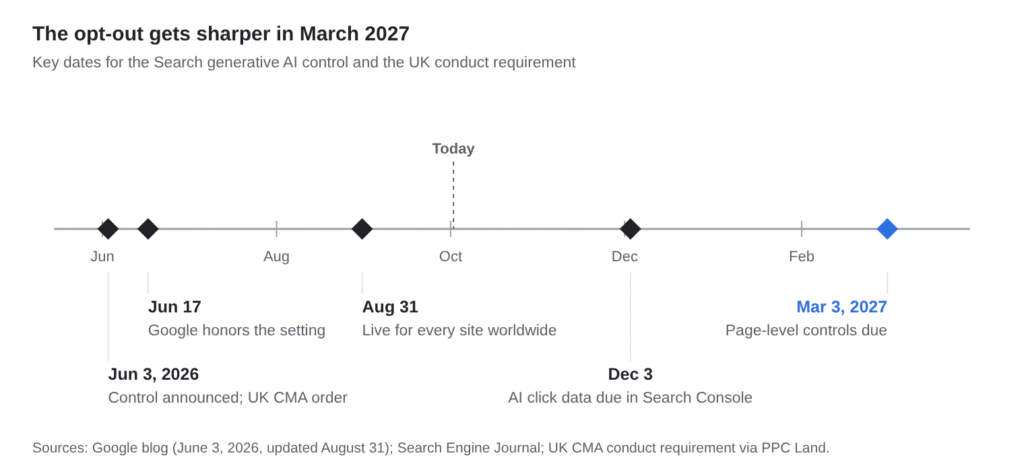
That shifts the decision from all-or-nothing to page by page. A software client, for instance, could keep 340 blog and comparison pages in the answer layer while excluding 25 benchmark data pages.
The mechanism hasn’t been announced yet, and the legal requirement covers users in the UK. Even so, page-level control won’t make opting out common. It will make it surgical.
The opt-out is a legitimate tool for a handful of clients and an expensive reflex for most. The difference lies in five questions, not in the headline that prompted the call.
Have a client asking to opt out? Send us the site, and we’ll run the framework against it and tell you plainly which way the evidence points.
Can you stop your website appearing in Google AI Overviews?
Yes. Since August 31, 2026, sites can use the Search generative AI control in Search Console to leave AI Overviews, AI Mode, and Discover’s AI features. The AI answer still appears, built from other sites.
Does blocking AI Overviews hurt your Google rankings?
No, according to Google. Its help page says the control is not a ranking signal elsewhere in Search. In the UK, a June 3, 2026 conduct requirement bars Google from penalizing opted-out sites.
Where is the AI opt-out setting in Search Console?
Go to Settings, then Search generative AI, and choose Include, Exclude, or Inherit from parent. Google says changes generally take a few days. Child properties follow their nearest configured parent unless set on their own.
Almost never. One control covers AI Mode and AI Overviews. Opting out removes the business from the answer, not the answer. Cited brands earn about twice the clicks, per Seer Interactive’s April 2026 study.
Can I opt out a single page or section?
Not a single page yet. Page-level controls are due by March 3, 2027 under the UK requirement. Today, a section can be excluded by verifying its folder as a separate URL-prefix property in Search Console.
Will opting out bring my traffic back?
Unlikely. The AI answer still shows after you opt out, so the clicks it absorbs do not return to your listing. You lose the citation clicks instead, while total search use keeps growing.