Nearly 46% of Google searches have local intent. People are actively searching for nearby services, stores, clinics, restaurants, and agencies every single day.
Google Business Profile has become the first impression for local businesses. Customers now check reviews, photos, business hours, and ratings before they visit a website or make a call. Businesses appearing in the Local Pack also receive far more clicks, calls, and direction requests.
A well-optimized Google Business Profile can increase calls, local traffic, and customer trust. In this guide, you’ll learn how Google ranks local businesses, how to improve your visibility on Google Maps, and how to turn your profile into a consistent source of leads and reviews.
Table of Contents
What Is Google Business Profile?
Google Business Profile is a free business listing platform from Google that helps companies appear in Google Search and Google Maps. Earlier, it was known as Google My Business. Businesses can manage how their information appears when customers search for products or services locally.
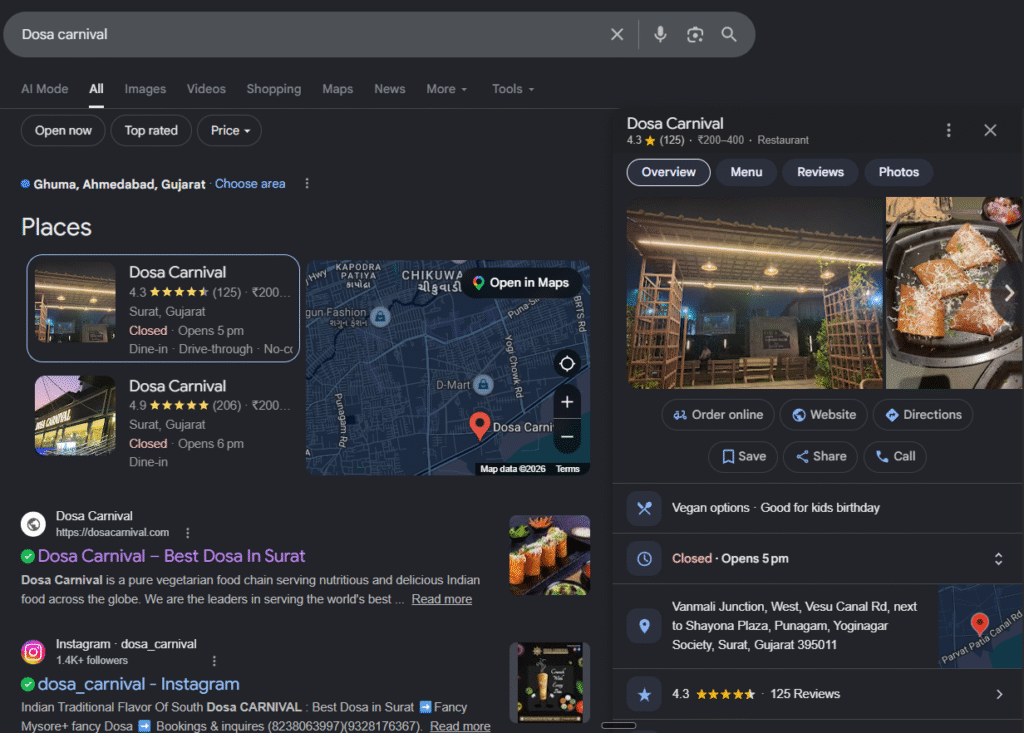
A Google Business Profile usually displays important business details directly in search results, including:
Business name
Address and phone number
Website link
Working hours
Reviews and ratings
Photos and videos
Services and products
Directions on Google Maps
Google also allows businesses to post updates, reply to reviews, answer questions, and track customer actions from the profile dashboard.
For local businesses, GBP works like a digital storefront. Customers often check your profile before visiting your website. A complete and active profile can improve visibility in local searches, increase trust, and drive more calls, visits, and inquiries from nearby customers.
Why Google Business Profile Matters More Than Ever
Local Searches Lead to Real Customers: Nearly 46% of Google searches now have local intent. People search for nearby restaurants, clinics, agencies, repair shops, and stores every day. A properly optimized Google Business Profile helps your business appear when customers are ready to take action.
Your Google Profile Is Often the First Impression: Many customers check your Google profile before visiting your website. Reviews, photos, ratings, operating hours, and responses shape trust within seconds. An incomplete or outdated profile can push potential customers toward competitors.
Google Maps Drives High-Intent Traffic: People searching on Google Maps usually have immediate intent. They may want to call, visit, book, or request directions right away. Businesses appearing in local map results often receive more qualified leads than standard website traffic.
Reviews Influence Buying Decisions: Google reviews now work like public recommendations. Positive ratings, recent feedback, and professional responses increase credibility. Google also considers review quality and activity as part of local ranking signals.
A Complete Profile Improves Trust: Google reports that customers are 2.7 times more likely to view a business as reputable when its profile is complete. Accurate information, fresh photos, updated hours, and active engagement all contribute to customer confidence.
Customers Take Action Directly from GBP: Modern users often skip websites completely. They call businesses, check directions, read reviews, and book appointments directly from Google Search or Maps. This shift has made GBP a major conversion channel for local businesses.
GBP Strongly Impacts Local SEO Rankings: Google uses relevance, distance, and prominence to rank local businesses. An active and optimized profile sends stronger local signals to Google, improving your chances of appearing in the Local Pack and Maps results.
How Google Ranks Local Businesses
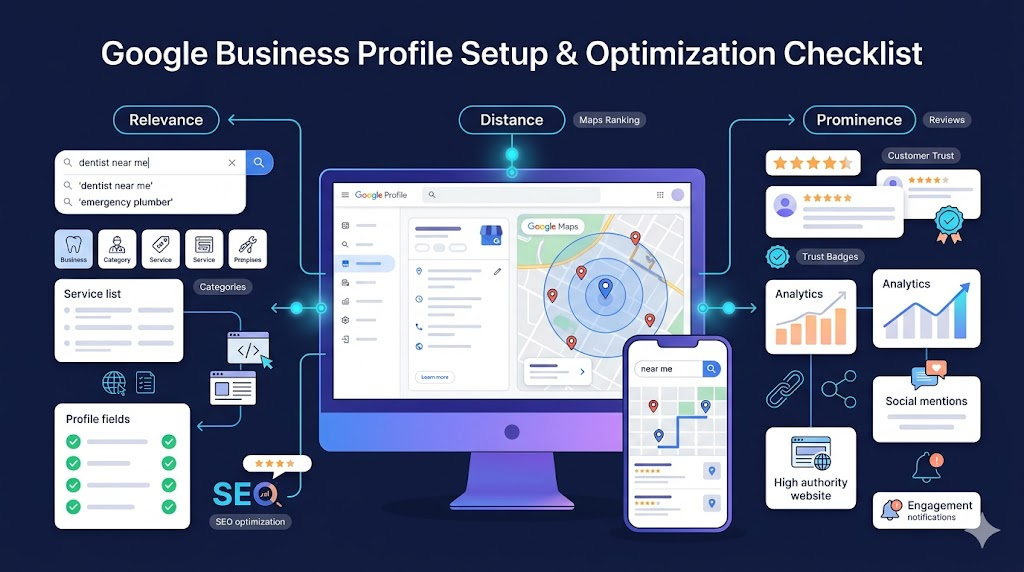
Google uses three primary factors to decide which businesses appear in local search results and Google Maps:
Relevance
Distance
Prominence
Google officially confirmed these ranking signals in its Business Profile documentation. The algorithm combines all three factors to match users with the most useful local results.
Relevance
Relevance measures how closely your business matches a search query. If someone searches for “emergency plumber” or “dental clinic near me,” Google checks whether your profile clearly reflects those services.
Google looks at details such as:
Primary business category
Secondary categories
Business description
Listed services
Products
Website content
Profile completeness
A fully completed profile gives Google more context about your business. This improves your chances of appearing for related searches.
Distance
Distance refers to how close your business is to the user searching. If a customer searches without mentioning a location, Google estimates their position using device data and nearby signals.
This factor matters heavily in “near me” searches. Businesses located closer to the searcher usually receive stronger visibility. Still, distance is not the only deciding factor. A business farther away can outrank nearby competitors if it has stronger relevance and trust signals.
Prominence
Prominence reflects how well-known and trusted your business appears online and offline. Google evaluates reputation using several signals across the web.
Important prominence factors include:
Number of Google reviews
Review quality and freshness
Local backlinks
Business mentions
Website authority
Local citations
Customer engagement
Brand reputation
Businesses with active profiles, strong reviews, and consistent online visibility often perform better in local rankings.
Google’s local algorithm constantly changes, but these three pillars continue to shape Google Maps and Local Pack rankings. Businesses that maintain accurate information, publish updates regularly, and build customer trust usually gain better long-term visibility.
Google Business Profile Setup & Optimization Checklist
A Google Business Profile works best when setup and optimization happen together. Many businesses create a profile, add basic details, and stop there. That usually leads to poor visibility, low engagement, and fewer customer actions. A properly optimized profile gives Google more trust signals and helps customers make faster decisions.
Create or Claim Your Business Profile
Start by searching your business name on Google. If a profile already exists, claim ownership instead of creating another listing. Duplicate profiles can confuse Google and weaken local ranking signals.
During setup, add:
Business name
Phone number
Address or service area
Website URL
Business hours
Primary category
Your business information should remain consistent across your website, social profiles, and local directories.
Choose the Right Business Categories
Your primary category has a direct impact on local rankings. It tells Google what your business actually does. Secondary categories help expand visibility for related services.
For example:
“Personal Injury Lawyer” performs differently from “Law Firm”
“Dental Clinic” performs differently from “Cosmetic Dentist”
Choose categories based on actual services instead of broad keywords.
Complete Verification Properly
Google requires verification before your profile becomes fully active. Depending on your business type, verification may happen through:
Video recording
Phone
Email
Postcard
Video verification is now common for local businesses. Google may ask you to show business signage, workspace access, tools, or branded vehicles.
Write a Useful Business Description
Your business description should explain:
What you offer
Who you serve
Your location or service area
What makes your business different
Avoid stuffing keywords unnaturally. Write for customers first.
Add High-Quality Photos Regularly
Photos influence customer trust more than many businesses realize. Users often compare profiles visually before making contact.
Add:
Exterior photos
Interior photos
Team photos
Products
Completed work
Before-and-after examples
Profiles with recent photos usually appear more active and trustworthy.
Add Services, Products, and FAQs
Many businesses ignore these sections completely. That creates missed ranking and conversion opportunities.
Use these areas to answer common customer questions, explain services clearly, and highlight important offerings. This also helps Google understand your business better.
Keep Your Profile Active
Google prefers profiles that show regular activity. An inactive profile may slowly lose visibility over time.
Update your profile with:
New photos
Business posts
Offers
Events
Holiday hours
Review responses
Regular updates signal that your business is operating actively and serving customers consistently.
Enable Messaging and Booking Features
Customers now expect fast communication. Google Business Profile allows businesses to receive direct messages, booking requests, and appointment inquiries from search results.
Reducing friction often increases conversions, especially on mobile devices.
Monitor Reviews and Respond Quickly
Reviews affect both customer trust and local rankings. Businesses with recent, high-quality reviews generally attract more clicks and calls.
Replying to reviews also matters. Professional responses show that your business pays attention to customer feedback, including negative experiences.
How to Get More Google Reviews Ethically
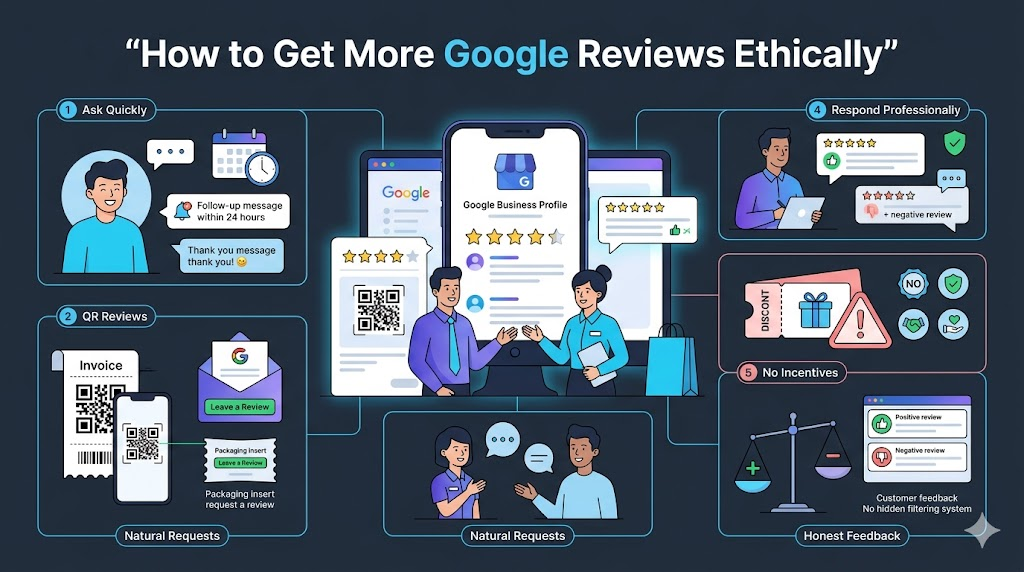
Ask Customers Soon After the Service: Customers are more likely to leave detailed reviews when the experience is still fresh. A short follow-up message within 24 hours usually works better than delayed requests.
Use Direct Review Links and QR Codes: Google allows businesses to generate direct review links and QR codes inside the Business Profile dashboard. Adding them to invoices, thank-you emails, receipts, or packaging makes the process faster for customers.
Train Staff to Ask Naturally: Simple in-person requests often feel more genuine than automated campaigns. Staff should politely invite feedback without sounding scripted or forcing customers to leave a positive review.
Respond to Every Review Professionally: Customers notice how businesses reply to feedback. Thanking people for positive reviews and handling complaints calmly can improve trust and encourage more customers to share their experiences publicly.
Never Offer Rewards for Reviews: Google prohibits discounts, gifts, cashback, contests, or incentives in exchange for reviews. Businesses using fake or incentivized reviews risk removals, penalties, and profile restrictions.
Avoid Review Gating Practices: Businesses should not ask only happy customers for reviews while filtering unhappy customers privately. Google considers this misleading because it hides balanced customer feedback from the public.
Common Google Business Profile Mistakes That Hurt Rankings
Using Different Business Information Across Platforms: Your business name, address, and phone number should remain identical everywhere online. Even small differences between your website, directories, and GBP can weaken local trust signals and confuse Google’s local algorithm.
Choosing Incorrect Business Categories: Many businesses select broad or unrelated categories hoping to appear in more searches. This usually hurts relevance instead of helping visibility. Your primary category should clearly match your core service.
Ignoring Reviews and Customer Questions: An inactive profile sends poor engagement signals. Businesses that never respond to reviews or unanswered questions often appear less trustworthy to both customers and Google.
Adding Keywords to the Business Name: Stuffing city names or extra keywords into your business title violates Google guidelines. Listings using fake naming tactics may face suspensions or ranking drops.
Using Low-Quality or Outdated Photos: Blurry images, stock photos, or old business photos can reduce customer confidence. Fresh and realistic visuals usually create better engagement and stronger first impressions.
Creating Duplicate Listings: Multiple profiles for the same business location can split reviews, traffic, and ranking authority. Duplicate listings also create confusion for customers searching on Google Maps.
Leaving Important Profile Sections Empty: Many businesses skip services, descriptions, products, FAQs, or business attributes. Incomplete profiles give Google less context about your business and reduce your chances of appearing for related searches.
Not Updating Business Hours Regularly: Incorrect working hours frustrate customers and increase negative reviews. Google also expects businesses to update holiday schedules, temporary closures, and operating changes accurately.
Posting Fake or Incentivized Reviews: Google actively removes suspicious reviews and may restrict profiles involved in review manipulation. Purchased reviews often create unnatural patterns that are easy for moderation systems to detect.
Advanced Google Business Profile Strategies
Build Local Citations Across Trusted Directories: Google compares your business details across multiple platforms to confirm legitimacy. Listings on directories like Justdial, Yelp, Bing Places, Apple Maps, and industry-specific portals can strengthen local trust signals when the information stays consistent everywhere.
Add Fresh Photos Regularly Instead of Uploading Once: Many businesses upload photos during setup and never update them again. Adding recent photos every few weeks signals ongoing business activity and keeps the profile visually active for customers browsing competitors.
Use Google Posts for Seasonal and Local Updates: Google Posts can support visibility for local promotions, events, limited-time offers, workshops, and announcements. Businesses that publish timely updates often keep profiles more active than competitors with inactive listings.
Earn Local Backlinks From Nearby Businesses and Media: Local backlinks still influence prominence signals. Mentions from local newspapers, business associations, event websites, sponsorships, and community blogs can strengthen local authority and improve geographic relevance.
Optimize for Voice and Conversational Searches: Voice searches are usually longer and more natural. Customers search using phrases like “best pediatric clinic near me open now” instead of short keywords. Adding conversational FAQs and detailed services can help capture these searches.
Track Customer Actions, Not Just Rankings: Many businesses focus only on keyword rankings while ignoring actual customer behavior. Monitor calls, direction requests, booking clicks, photo views, and website visits inside GBP Insights to understand what drives real business activity.
Keep Review Velocity Consistent: A steady flow of recent reviews often looks more natural than getting many reviews at once and then staying inactive for months. Consistent review activity also signals ongoing customer engagement to Google’s local systems. (searchenginejournal.com)
Use the Q&A Section Before Customers Ask Questions: Businesses can proactively add common customer questions and answers directly inside GBP. This helps reduce confusion about pricing, parking, booking policies, delivery areas, or service availability before customers contact the business.
FAQs
How long does Google Business Profile optimization take?
Most businesses notice better visibility, calls, or profile activity within a few weeks. Competitive industries and locations may take longer because local rankings depend on trust, reviews, relevance, and profile activity.
Does posting regularly on Google Business Profile help rankings?
Google Posts may not directly improve rankings, but active profiles often attract more engagement, clicks, and customer actions. Regular updates also show customers that the business is operating actively.
Can businesses without a physical storefront use Google Business Profile?
Yes. Service-area businesses like plumbers, electricians, cleaners, and consultants can create profiles if they serve customers directly at customer locations instead of operating from public storefronts.
How many Google reviews are needed to rank higher locally?
There is no fixed number. Google looks at review quality, freshness, frequency, and overall trust signals. Consistent genuine reviews usually perform better than sudden spikes of review activity.
Can incorrect business information hurt local rankings?
Yes. Incorrect phone numbers, addresses, business hours, or duplicate listings can confuse Google and customers. Consistent business information across all platforms helps strengthen local search trust signals.