
A client calls your account manager on Monday morning. Their organic traffic has dropped by 30% over the last two weeks. They want to know what happened, whether Google introduced another algorithm update, and when their rankings will return.
The first thought is often a Google update. It is an easy explanation, especially when several websites seem to be losing traffic at the same time.
But what if the website was redesigned three weeks ago? What if someone changed the URL structure, updated a WordPress plugin, or rewrote 50 blog posts? Any of these changes could affect organic visibility.
A SEO ranking drop needs a proper investigation before anyone starts changing titles, rewriting content, or asking developers to rebuild pages.
Google itself lists several reasons for declining search traffic, including algorithm changes, technical errors, security issues, manual actions, changing search demand, and website migrations.
Here is a practical process your team can follow to find the cause and decide what to do next.
Quick answer: Before blaming a Google update for a ranking drop, check three things: whether the drop matches a confirmed update on Google’s Search Status Dashboard, whether other websites targeting the same search terms experienced similar changes, and whether your own website changed in the previous 30 days. If the decline is limited to your website or a specific section, investigate internal changes first.
Google changes its search systems regularly. Some updates affect a large number of websites, while others have a smaller impact on particular topics or search results.
However, a traffic decline does not automatically mean Google has changed its ranking systems.
Consider this example.
An agency manages SEO for an e-commerce client. The client approves a new website design. During the redesign, the development team changes product URLs, updates category templates, and removes some product descriptions to make the pages shorter.
Two weeks after launch, organic traffic starts falling.
The client assumes Google has introduced an algorithm update. But the actual cause could be incorrect redirects, missing product information, or changes to internal links.
This is why checking the website’s recent activity matters just as much as checking Google’s announcements.
Google’s traffic debugging guide lists several possible causes and explains how to investigate them using Search Console and Google Trends.
The goal is not to rule out Google updates. It is to avoid making changes before you know what happened.
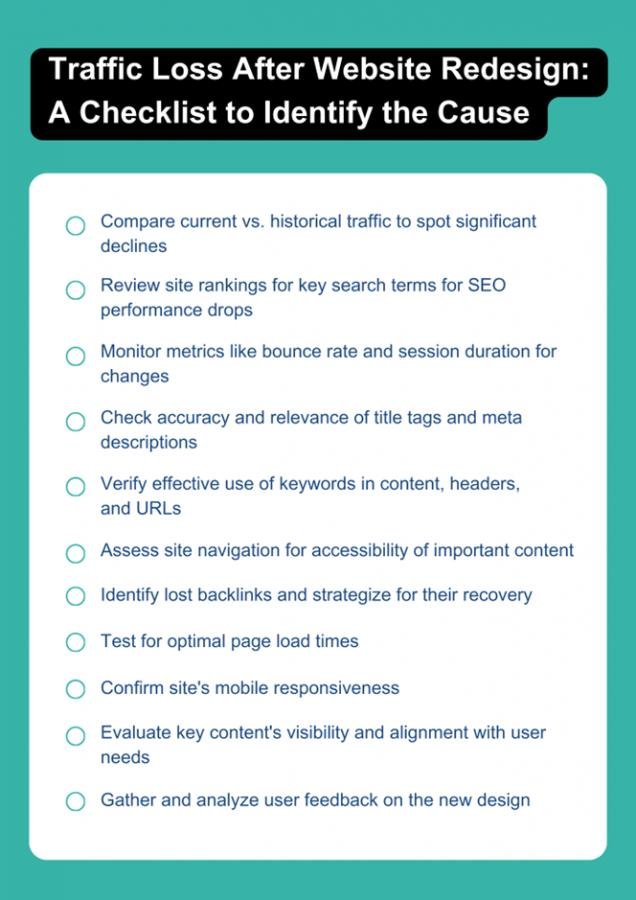
Follow these six steps when a client reports a sudden decline in organic traffic or search rankings.
Start with Google’s Search Status Dashboard.
It lists confirmed incidents affecting Google Search, including core updates and spam updates. Check the start and completion dates, then compare them with the date the website started losing traffic.
For example, if a ranking decline began around the same time as a confirmed core update, the update deserves attention. But that timing alone does not prove it caused the decline.
You should also check the Google Search Central Blog for official announcements and guidance.
What about third-party SEO tools?
Platforms such as Semrush and Similarweb track changes in search results. They can help you understand whether search results are moving across several websites.
Useful tools include:
Use these tools as supporting evidence. A volatility spike does not confirm that Google has released an update.
What to record: The update name, rollout start date, completion date, and the date your client’s traffic first declined.
If the dates do not match, move to the next checks instead of forcing an algorithm-related explanation.
This is one of the most useful checks in the entire process.
Do not look at the overall traffic graph and stop there. Find out which pages have lost clicks, impressions, and positions.
Open Google Search Console and go to the Performance report. Compare the affected period with the previous period or the same period last year.
Then review the Pages and Queries tabs.
You will usually find one of three patterns.
Most important pages across the website have lost visibility.
Possible causes include:
Only one category or section has lost traffic.
For example, a website may still receive traffic from its homepage and service pages, but its entire blog section has lost impressions.
Check whether the affected pages share the same template, plugin, internal linking structure, or recent content update.
Only a few URLs have lost rankings while other pages remain stable.
In this case, review the affected pages individually. Look for changes to their content, titles, canonical tags, internal links, and search intent.
A useful example: if 40 pages in the same directory lose impressions on the same date, check what changed in that directory before reviewing every page separately.
Google also recommends checking traffic by query, page, country, device, and search appearance to find patterns.
Read its Search Console traffic debugging guide for more details.
Now comes the part that many teams overlook.
Ask the developer, content team, and account manager what changed on the website during the month before the traffic decline.
Do not rely only on the deployment history. Some changes happen through the CMS without a developer being involved.
Review these areas:
| Website change | What to investigate |
| Redesign | Changes to page templates, headings, content, and internal links |
| Migration | Old and new URLs, redirect mapping, and indexing |
| URL changes | Whether old URLs redirect to their correct new pages |
| Plugin updates | Changes to SEO settings, caching, or page rendering |
| Content rewrites | Missing sections, removed examples, and changes in search intent |
| Metadata updates | Changes to titles, descriptions, and canonical tags |
| Internal linking | Removed links or changes to important page paths |
For example, a content team may update 60 blog posts in one week. The new versions look cleaner, but they remove product comparisons, technical details, and examples that made the original pages useful.
If those pages start losing impressions shortly afterwards, the content changes deserve a close review.
Create a simple change log with four details: what changed, which URLs were affected, who approved it, and when it went live.
This will make future investigations much easier.
Your website is not the only one competing for a search query.
Sometimes your rankings fall because another website has published a more useful page, updated old information, improved its website, or started targeting the same search terms.
Take 10 to 20 keywords that brought traffic before the decline. Check the current search results and compare the websites that now rank above your client.
Look for changes such as:
You can use Ahrefs, Semrush, or another rank-tracking platform to compare keyword movements.
There are two useful patterns to watch.
If several competitors also lost visibility, a wider change in Google Search or search demand may be involved.
If your client’s pages dropped while competitors gained positions, investigate differences in content, technical setup, and relevance.
One caution: competitor movement is evidence, not proof. A Google update can affect websites differently, and a competitor gaining traffic does not automatically mean your client’s site has a technical problem.
A website can look perfectly fine to visitors while important search elements are broken.
This is common after redesigns, migrations, and CMS updates. A developer may fix the visible issues but miss a setting that affects crawling or indexing.
Here are five checks your team should run.
Check whether important pages point to the correct canonical URLs.
A canonical tag that points to another page can tell Google that the other URL is the preferred version. If Google selects a different canonical URL, the original page may not appear in search results.
Use Google’s canonicalization troubleshooting guide.
Check whether important pages have accidentally received a noindex directive.
This can happen when a staging website is moved to production and development settings are not removed.
Check both the HTML source and HTTP response headers.
Review the robots.txt file to make sure important sections are not blocked from crawling.
Pay close attention to changes made during migrations or website launches.
Test old URLs and confirm that they redirect to the right destination.
For example, an old product page should ideally redirect to its matching new product page, not to the homepage or a general category.
Also check for redirect loops, broken links, and unnecessary redirect chains.
Compare the page source with the rendered version of the page.
If important content, links, or headings only appear after JavaScript runs, check whether Google can access them.
Google explains how JavaScript affects crawling and rendering in its JavaScript SEO documentation.
For this review, use Google Search Console’s URL Inspection tool and a crawler such as Screaming Frog.
AI tools are now part of many SEO and website development workflows.
Teams use them to rewrite articles, generate metadata, create redirects, restructure websites, and suggest technical changes.
The problem starts when teams apply these suggestions in bulk without checking their impact.
Here are three examples worth investigating.
An AI tool recommends shorter URLs across the website. The team changes hundreds of URLs but misses some redirect rules and internal links.
Old pages stop sending visitors and search crawlers to their correct destinations.
A developer uses AI to generate a redirect script. The code appears to work, but several old URLs point to the same category page instead of their matching new pages.
A quick manual review of a few URLs may not catch the full problem.
An AI tool rewrites 100 articles to make them shorter and more consistent.
However, the new versions remove original examples, product details, comparisons, and answers to specific search queries.
The pages may now be less useful than they were before.
Using AI to create or update content is not automatically against Google’s guidelines. The concern is whether the published content offers real value to readers. Google’s guidance on generative AI content and its spam policies explain the rules.
The practical rule is simple: review AI-generated changes before publishing them, especially when they affect hundreds of URLs.
A sudden traffic decline can put pressure on an agency team. Clients want quick answers, and account managers want to show that something is being done.
But making several changes without finding the cause can make recovery harder.
Avoid these five reactions:
1. Rewriting every page that lost rankings: A page may have lost visibility because of indexing or redirect issues. Rewriting its content will not fix those problems.
2. Changing every title and meta description: First check whether impressions, rankings, or click-through rates actually changed.
3. Removing old content without reviewing its performance: A page that looks outdated may still bring valuable traffic and leads.
4. Starting another redesign: If the previous redesign caused the problem, making more changes without a technical review can add to the damage.
5. Publishing hundreds of replacement articles using AI: More content does not fix a technical issue or make an existing page more useful.
Keep a record of each change you make. It is much easier to understand the result when you change one major thing at a time.
Once you have identified the likely cause, create a recovery plan based on the affected pages.
Follow this order:
How long does recovery take?
There is no fixed timeline.
Google says that after a site migration, most URLs on a small or medium-sized website may take a few weeks to move to their new versions in search results. Larger websites can take longer.
For ranking improvements after content or site-wide changes, some effects may appear in days, while others can take several months.
If a confirmed core update is involved, Google recommends waiting until the rollout has finished and then allowing at least one full week before assessing the impact.
You can read the details in Google’s site migration guide and core update guidance.
The important thing is to fix the identified problem and give Google time to process the changes. Repeatedly changing the same pages every few days will not make that process easier.
A decline in organic traffic does not always mean Google has changed its algorithm. Sometimes the reason is much closer to home: a redesign, a migration, a plugin update, or a content change that nobody thought would affect search performance.
For digital agencies, a proper ranking investigation should be part of the client management process. Keep a record of website changes, monitor important pages, and involve developers when technical issues appear.
The next time a client reports an SEO ranking drop, do not rush to rewrite their website. Start with the evidence.
Managing SEO campaigns, content updates, website changes, and technical fixes across several client accounts takes a capable team.
Stellites works with digital agencies as a white-label partner, providing dedicated SEO and digital marketing experts, website developers, and website maintenance support.
Whether you need help with on-page SEO, technical SEO, content marketing, WordPress development, or ongoing website maintenance, our team can work within your agency’s processes and under your brand.
You can explore our white-label SEO and digital marketing services, white-label website development, and WordPress maintenance services.
Want to add more delivery capacity without building another in-house team?
Book a discovery call with Stellites and ask about the 7-day free trial.