Most Shopify stores struggle to get organic traffic. They rely heavily on ads, but the moment you stop spending, the traffic drops.
SEO works differently. It helps your store show up on Google when people are already searching for products. That means better intent and higher chances of conversion.
In fact, organic search drives 43% of all ecommerce traffic, making it one of the most important growth channels.
If you want steady traffic without depending on ads, Shopify SEO is not optional. It is a core part of growth.
In this guide, we will cover how Shopify SEO works, how to set it up, and practical steps to rank your store and drive consistent sales.
Shopify SEO is the process of improving your Shopify store so it appears in Google search results when people look for products you sell. It includes changes to your pages, content, and site structure.
It is similar to general SEO, but with a few platform-specific factors. Shopify has its own URL structure, built-in features, and certain limits that affect how optimization is done.
For example, Shopify automatically creates sitemaps and handles hosting, but gives limited control over some technical elements. So, the approach needs slight adjustments compared to custom-built websites.
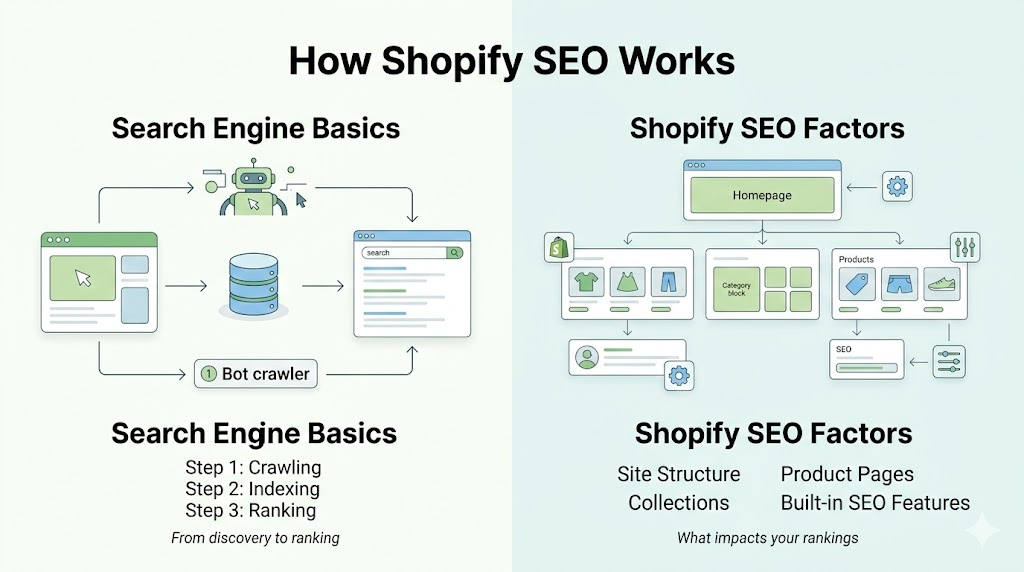
Search engines follow a simple process before showing your store in results.
If your pages are not crawled or indexed properly, they will not show up in search results.
Ranking depends on multiple factors, including relevance, content quality, and how users interact with your store.
Site Structure
Google needs to understand how your store is organized. A clean structure looks like this: Homepage to Collection pages to Product pages. When your store is logically organized, Google crawls it faster and users find what they need without getting lost.
Product Pages
These are your money pages. Each product page needs:
Thin or duplicate content on product pages is one of the most common reasons Shopify stores struggle to rank.
Collections
Collection pages are often ignored, but they hold serious ranking potential. A well-optimized collection page targeting a category keyword can pull in buyers who are still deciding what to purchase.
Built-in SEO Features
Shopify gives you some useful tools out of the box:
They’re a solid starting point, but they won’t do the heavy lifting on their own.
Shopify SEO covers three areas: on-page work like titles and descriptions, technical work like site speed and crawlability, and off-page work like building backlinks. All three matter.
Most stores skip this part and jump straight to keywords or content. That often leads to poor results, even if everything else is done right. Your setup decides how well search engines can access, understand, and track your store.
Before making any changes, you need proper tracking in place. Without data, it is hard to know what is working and what needs fixing.
Together, these tools give you both visibility and control over your SEO performance.
Search engines need a clear map of your store. Without it, some pages may never get discovered.
If your sitemap is not submitted or if indexing issues exist, even well-optimized pages may not appear in search results.
Your theme affects both user experience and SEO performance. A poorly coded theme can slow down your store and hurt rankings.
Before choosing a theme, test its speed and responsiveness instead of relying only on design.
Your domain plays a small but important role in SEO and branding.
A clear domain structure also makes it easier for users to remember and return to your store.
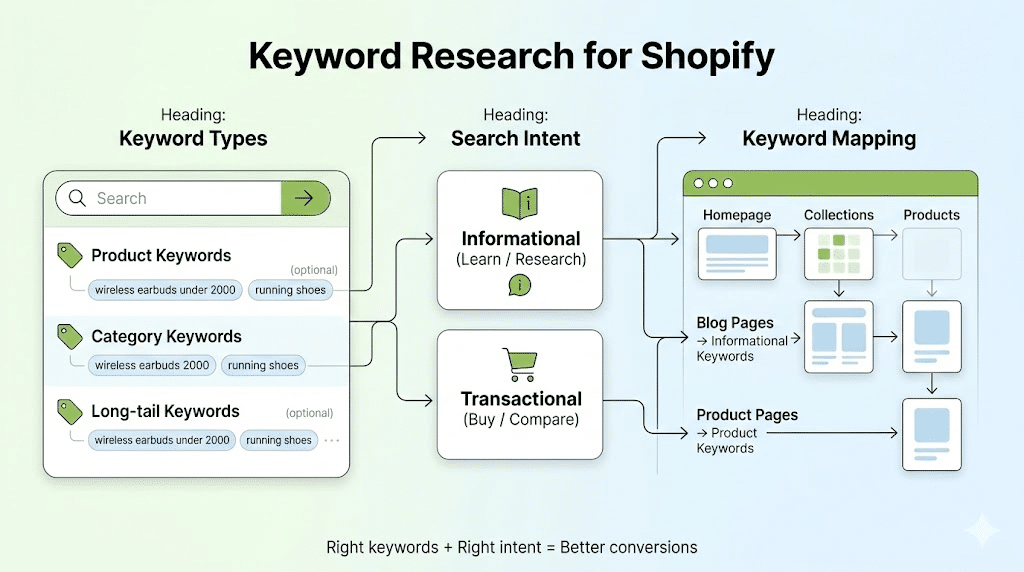
Keyword research decides who finds your store and for what reason. If you target the wrong terms, you may get traffic but no sales. The goal is to match what people are searching with what you are selling.
Start by identifying the different types of keywords relevant to your store. Each type serves a different purpose.
A good strategy includes a mix of all three, instead of focusing only on high-volume keywords.
Not every search means the same thing. Understanding intent helps you choose the right keywords for the right pages.
If the intent does not match the page, even good rankings will not lead to conversions.
Once you have your keywords, the next step is to assign them properly across your store.
Each important page should target a primary keyword along with a few related terms. Product pages should focus on specific product keywords, while collection pages should target broader category terms.
Avoid using the same keyword on multiple pages, as it can confuse search engines and weaken rankings. A clear mapping ensures that every page has a defined purpose and supports overall SEO performance.
Keyword research is not a one-time task. As trends change and new products are added, your keyword strategy should also evolve to stay relevant and competitive.
On-page SEO is where most of your ranking impact comes from. Small improvements across key pages can make a clear difference in visibility and conversions.
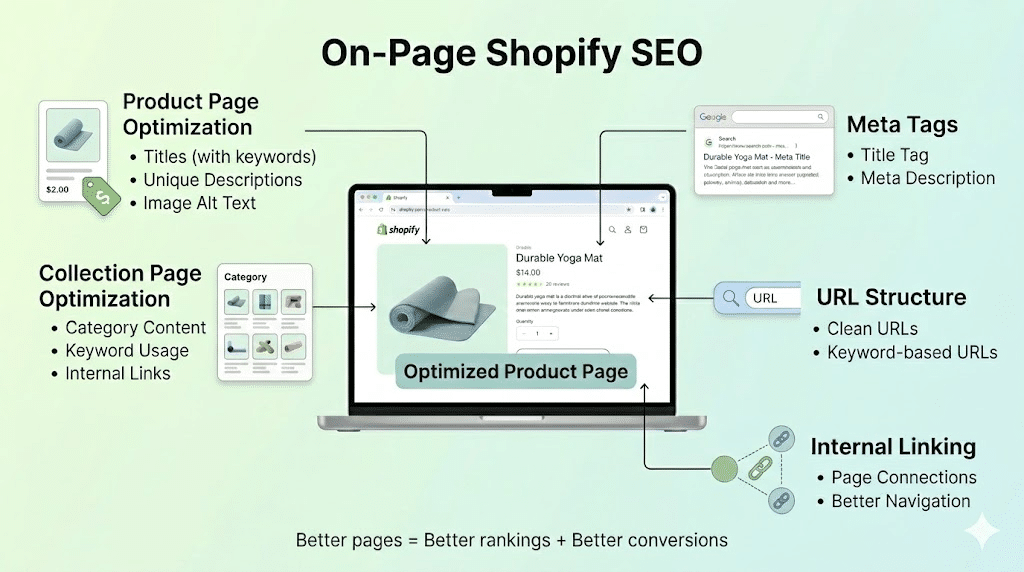
Product pages should be clear, relevant, and focused on search intent.
Collection pages often target broader keywords, so they need more context.
Meta tags influence how your pages appear in search results.
Keep URLs short, readable, and relevant to the page.
Avoid unnecessary words or numbers. A clean structure makes it easier for both users and search engines to understand the page.
Internal links help connect your store pages and guide users.
They improve navigation and allow search engines to crawl your site more effectively. Linking related products and collections also keeps users engaged longer.
Metadata, URLs, and page content work together. When optimized properly, they directly improve how your pages rank and perform.
Many Shopify stores ignore technical SEO, and that is where problems start. Even well-written pages will struggle if the site is slow, hard to crawl, or poorly structured behind the scenes.
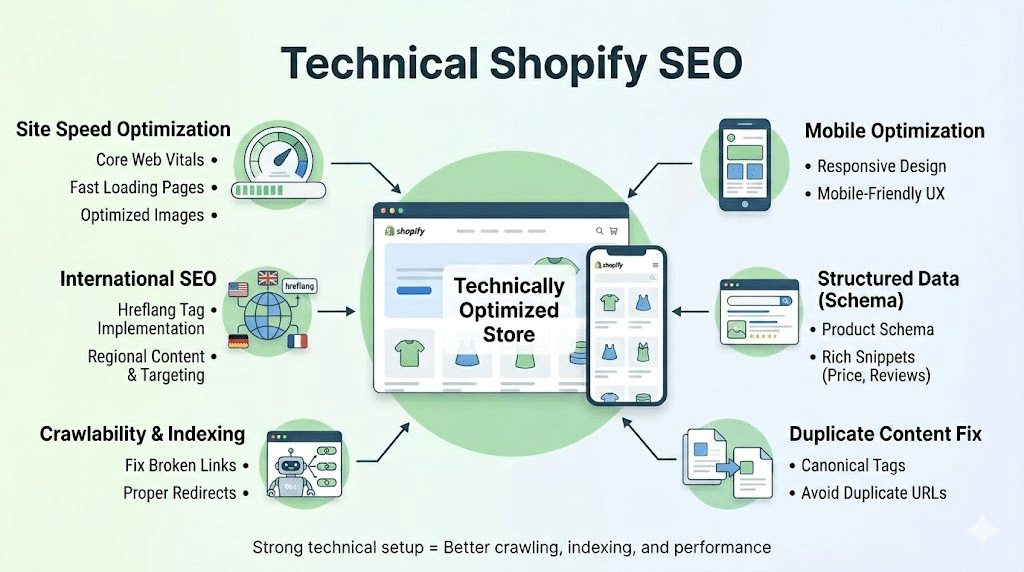
Speed affects both rankings and user behavior. If a page takes too long to load, users leave before interacting.
Most ecommerce traffic comes from mobile devices, so your store must work smoothly on smaller screens.
A responsive design ensures that layout, text, and buttons adjust properly across devices. If users struggle to browse or checkout, it affects both rankings and conversions.
Structured data helps search engines understand your content in a more detailed way.
Shopify can create multiple URLs for the same product, which leads to duplicate content issues.
Canonical tags help solve this by telling search engines which version of the page should be treated as the main one. This prevents ranking confusion.
Search engines need clean access to your store pages.
Technical SEO ensures your store is easy to access, fast to load, and properly understood by search engines. Without this, other SEO efforts will not perform as expected.
Content plays a key role in bringing the right audience to your store. It helps you target more search queries and gives users a reason to stay, explore, and trust your brand.
Blog content helps you target searches that are not directly product-focused.
Instead of only pushing products, write articles around common questions and problems your audience has. This is where informational keywords come in.
For example, if you sell skincare products, topics like “how to choose a face serum” can bring relevant visitors who may later convert.
Many Shopify stores use the same product descriptions as suppliers. This creates duplicate content and weakens your visibility.
Write your own descriptions with clear, useful information. Focus on how the product helps the user, not just what it includes. Simple and direct content works better than generic text.
FAQ & User Intent Content
FAQs help you answer real questions that users already have.
You can add FAQ sections on product pages, collection pages, or blog posts. This improves clarity and also helps you target more specific search queries.
Over time, this type of content builds relevance and supports better rankings across different keywords.
Content helps search engines understand your store better and allows you to reach users at different stages, not just when they are ready to buy.
Off-page SEO is about how other websites and platforms refer to your store. These signals help search engines judge how trustworthy and relevant your brand is.
Backlinks are links from other websites to your store. They act as signals that your content is worth referencing.
Focus on getting links from relevant and trusted sites in your niche. This can come from guest posts, product features, or partnerships. A few strong links often matter more than many low-quality ones.
Social media does not directly control rankings, but it helps your brand reach more people.
When your content gets shared, it brings traffic and increases visibility. Over time, this can lead to more mentions and links from other websites.
Mentions from influencers, bloggers, or media platforms can bring both traffic and credibility.
If your products are featured in reviews, lists, or articles, they often include links back to your store. This strengthens your authority and helps your pages perform better in search.
Backlinks and brand mentions work as trust signals. The stronger your presence outside your store, the better your chances of ranking higher.
SEO without tracking is guesswork. You need clear data to see what is working, what needs improvement, and where you are losing potential sales.
Focus on a few metrics that directly reflect performance and business impact.
To track these metrics, you need reliable tools that give accurate insights.
Tracking connects your SEO work with actual results. It helps you make informed decisions instead of relying on assumptions.
Many Shopify stores do the basics but still fail to see results. The issue is often not effort, but direction and consistency.
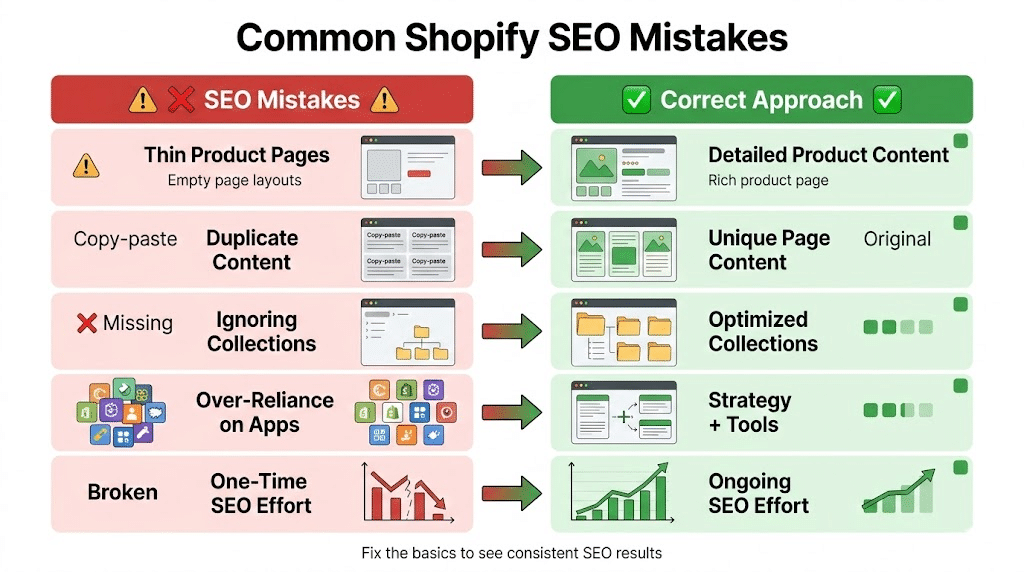
Most of these mistakes come down to poor planning and inconsistency. Fixing them can lead to noticeable improvements over time.
Shopify SEO is not a quick fix. It takes time to see strong results, but once your pages start ranking, the impact can be steady and cost-effective. Unlike paid ads, traffic does not stop the moment you pause spending.
Consistency makes the difference. Regular updates, better content, technical fixes, and ongoing keyword refinement keep your store competitive in search results.
Start with the basics. Set up tracking, fix technical gaps, and optimize your main pages first. Once the foundation is strong, you can expand into content, link building, and advanced improvements to scale your growth over time.
Is Shopify SEO worth it?
Yes, especially if you want consistent traffic without relying only on ads. It helps your store appear when people are actively searching, which often leads to better-quality visitors and higher chances of conversion.
How long does it take?
SEO takes time. In most cases, you may start seeing initial results in 2 to 3 months, but stronger and stable growth usually takes 4 to 6 months or more, depending on competition and effort.
Do I need apps?
Apps can help with tasks like speed optimization or schema, but they are not enough on their own. Strategy, content, and proper setup matter more than tools.
Can Shopify rank on Google?
Yes, Shopify stores can rank well on Google. Many high-performing ecommerce sites use Shopify. With the right SEO approach, your store can compete and rank for both product and category keywords.